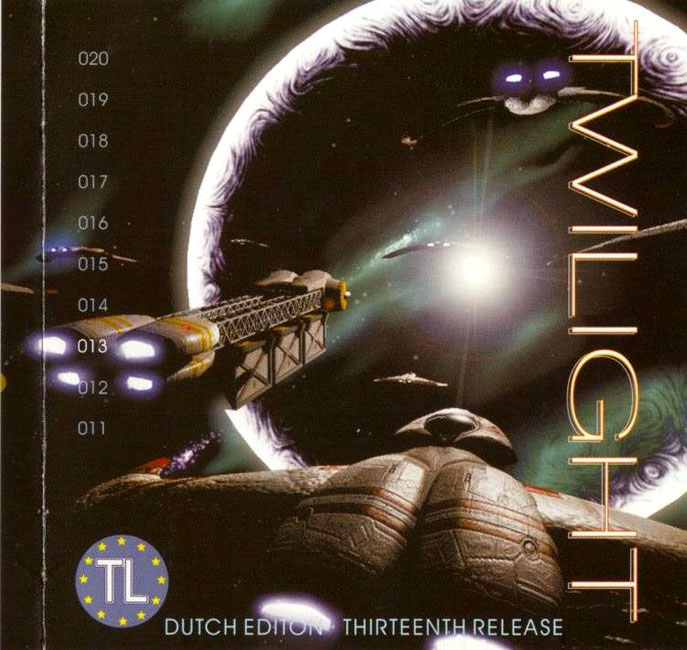
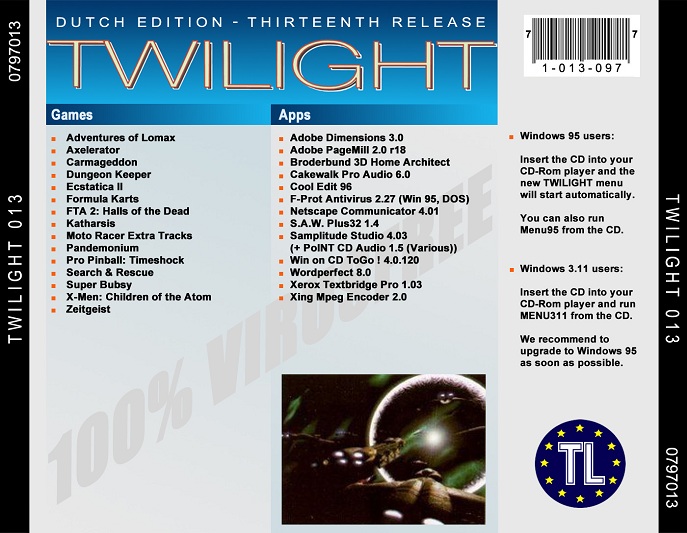
Twilight 013 – 0797013 – Dutch Edition
Covers
ABOUT.TXT
  Welcome!

  Welcome, once again, to another great release of Twilight!

  There are two versions of the Windows menu (as you already noted I guess),
a 32-bit version for Windows 95/NT and a 16-bit version for Windows 3.x. The
16-bit version is menu311.exe in the root directory of the CD. As less and less
software these days will run on Windows 3.x or DOS we strongly recommend that
Windows 3.x users upgrade to Windows 95 or NT. Windows 95 can be found on TL 7,
Windows NT 4.0 Workstation on Twilight 5. In the future we will not continue to
support Windows 3.x (even Microsoft doesn't) and any enhancements to the menu
(there have been a few) will only be implemented in the 32-bit version.

  If you want just a quick peek at the list of programs and don't bother about the
screenshots, then you can also start the Windows 3.x version (menu311.exe) from
Windows 95, as we left the screenshots out of that version.

  We hope you'll all enjoy this great collection of software!

  The Wares

 To be able to fit as many games as possible on one CD, we have compressed
   nearly all games; Most of them are already big enough! Fortunately, uncompressing
   these games is extremely easy from the Twilight menu. Just select the drive where
   you want it to go and click Install. And the game of your choice is uncompressed,
   and you're ready to go.

 As for applications, we try put on as many as possible uncompressed for easy
   installation. Practically every application has its own setup/installation-utility,
   Installation can be performed directly from the menu for all those applications
   that are not compressed. In those cases clicking the Install button will directly
   start the setup/installation-utility from the menu.

   Note: to make it easy for you to catalogue, print or whatever a file LIST.TXT
     is included in the Menu directory. In this file you will find the
     the games and applications that are on the CD.

  Betas?!

 A beta-version of a game or application is a rare thing on Twilight. However,
   sometimes we decide to put one on; We keep the following rules in mind deciding
   whether to do so or not:
  - The program should have an extreme appeal to a lot of people,
    i.e. newsgroups are already being created on the Internet;
  - It's stable (we test it as accurately as possible);
  - The full version is scheduled for release sometime near the End
    Of Time.

  The VARIOUS-Directory

When compiling this CD, we came across a lot of files which were not suitable
  for inclusion in the main list. However, we figured that these files might be of
  interest to many people since these usually include trainers, cracks, solves, docs,
  utilities and usefull things. We selected the most interesting files and put them
  together in the VARIOUS-directory of the CD.  Please note though, that we did NOT
  check any of these files (except those that are mentioned in the Release Info,
  games and apps descriptions)! A list of all files in the VARIOUS-directory with a
  short description (in most cases just the full name of the program) can be viewed
  by selecting the various tab in the menu. You can extract the file to a directory
  of your choice by clicking the install button, after which a directory selectbox
  will pop-up.

  The various list contains the names of the programs instead of the zip files
  for easier browsing, if you need it the name of the ZIP file is displayed in
  the description box.

  Note: the various directory also contains a file VARIOUS.LST which you can use
    for your easy reference, printing or whatever.

  The Twilight Installer/Menu

The Twilight Installer enables you to easily select and unpack a program.  Some
  of its features are:
  - Online Help-Service (you're reading it);
  - Screenshot-viewing;
  - Simultaneous viewing of the menu and installing
  - Simultaneous installing of multiple programs to different destinations
  - Auto-checking for free diskspace;
  - Paste&Copy serial numbers
  - View contents of previous releases

  When you have selected a program you want to install click on the install button.
  If it is program that is packed it will be extracted to drive you selected using
  the drive selector which will also indicate if you have enough free space on that
  drive. When you selected a program that is not packed on the CD then the apropriate
  setup program will be launched. In some cases you have to extract to a directory
  that is specific to your system, you then will be prompted with a directory selector.

When you browse through the list the screenshots will automatically appear. If a
  title has more than one screenshot you can view them using the [<<] and [>>] buttons.

When you've selected a title and launched it's installation process by clicking the
  install button, you can continue browsing through the menu and install other titles
  as you wish.

By clicking on the numbers in that are in the upper graphics box you can
  view the contents of previous releases.

Some (mostly windows applications) require you to fill in a serial number during
  or after installation. If so then the serial number is included in the description
  of the program. Use you're mouse to select it and then press Ctrl-C to copy it into
  the clipboard buffer. When prompted for the serial number make sure the cursor is
  active in the right box and press Ctrl-V to paste the number from the clipboard.
  This will save you remembering or writing down the serial number.

  Not Enough Free Diskspace?

The installer will automatically check if there's enough free diskspace on the
  selected harddisk. If a program that is unpacked needs additional installation then
  the required size that is indicated is that of the -intermediate- files, not the
  final installation, so you will always have enough space to unpack (before this was
  the other way around). Games that use an intermediate installation will in some cases
  need about the same amount for final installation and the intermediate one, in other
  cases the intermediate installation will still be used as the "Original" CD.
  Applications that are installed using their custom installation-program quite often
  offer a variety of different installation-options the size that is indicated is the
  size that is required for a Typical, Default or common installation. For an application
  that is stored in compressed format on the CD the size of the decompressed/intermediate
  installation is indacated (same as with the games).

  Twilight Easy Installation

We included a small program called TL.EXE with most games that run in a DOS mode.
  It enables you to select common operations, such as Setup or Run Game from a menu.
  Make your choice using the cursor-keys and push Enter to select. Also available with
  some titles is Read Documentation; We included a small doc-file with some, giving you
  information on how to install, trouble shooting or anything else that might be of
  importance.  So make sure you take a look at it! In some cases a TL.BAT is provided
  instead of a TL.EXE so just type TL and you'll be OK. Please note that TL.EXE is never
  included with a Windows-only game. As the menu is very easy to access and you might
  want to know in advance we mostly provide information about special install etc. in
  the description of the program in the menu, PLEASE DO READ IT!

  Software Testing

We tested ALL programs on a couple of different systems with totally different
  configurations (CPU, Memory, Network, Harddisk, OS, etc.). We have found all programs
  to work perfectly, but it is possible that you run into trouble.  If you do, please
  read the Troubleshooting-section later on.  There are millions of different PCs out
  there...  Some people told us that they couldn't get certain games to work. Once again
  we say that all games work on our machines. So if a game doesn't run, first read any
  the complete description of the program in the menu (you might have overlooked some
  special install instructions) next check for a DOCS&NFOTL.TXT to see if there are hints
  for installing and running a program. If the Troubleshooting-section didn't help either,
  then it's probably not our fault but the programmers of the game's problem! Some people
  are still forgetting to read all the information we provide, please read it before you
  decide a game doesn't run.

  Operating System indication

With each game or application the OS it runs on is given. Below an explanation
  of the types used (they are pretty self explanatory though):

    - DOS, this is a native DOS program. It is possible that it will run in a DOS
           box under Windows on your system. What it says is that we encountered
           problems running this program under Windows with at least one of the
           machines we tested on.
    - Win95, this is a Windows program that will run in Windows 95, don't bother
           trying this if you're still using Windows 3.x.
           Though not indicated this program will most likely run in Windows NT,
           this is however not tested.
    - DOS/Win95, this is either a dual program, ie two versions a supplied one for
           each OS or it is a DOS based program that will run in a Windows DOS box.
    - Win95/NT, will run on both, 95 and NT.
    - Windows, program that will run on Windows 3.x and Windows 95.
    - Win311, nah, you won't find any of these on Twilight.

  Virus Checking

We have performed virus-checking with the latest versions of:

    - Thunderbyte Anti-Virus (TBAV);
    - McAfee Scan;
    - F-Prot;
    - Dr Solomon's Toolkit.

This CD is 100% free of any known viruses; It's absolutely impossible for any known
  virus to make it through to the final version of the CD! As stated above, we scan with
  the latest versions of the best virus-scanners; Only if all scanners are unable to
  detect a certain virus, we're defenseless.  Since we also use heuristic scanning, that's
  not very likely to happen.

  Got A Problem?!

This section is intended as a trouble-shooting guide; It tries to give you some
advice if you cannot get a program to work.

   - Your joystick can't be calibrated. A lot of windows games don't have the
     of calibrating your joystick. This has to be done from the Windows control
     panel. Select Setting->Control Panel from the Windows Start menu and double
     click Joystick and then calibrate it.
   - The game you're trying to run needs DirectX, it's on the CD install it.
   - Some games require "Z" technology, ie your Z drive has to be
     available for SUBSTing. Put LASTDRIVE=Z in your CONFIG.SYS to fix this.
     Formerly we would use the A drive for substing but this disables access
     to your floppy drive, so we changed it. Also make sure SUBST.EXE is in
     your path (eg. your DOS-directory).
   - If you're immediately getting a PKUNZIP returned an error while
     depacking error when trying to unZIP a program, you're probably
     low on memory.  Try freeing up some more conventional memory
     (memory below the 640K border) before trying again.
   - Trying to run a program which requires 16 MB of memory when you've
     only got 8 doesn't make sense.
   - If you're low on diskspace, try removing some files.  Some
     programs (especially under Windows!) require some free diskspace
     to fiddle around with.
   - Try increasing the FILES= statement in your CONFIG.SYS.
   - Remove SMARTDrive (when running DOS mode).
   - If you're using Windows, put the Windows-directory in your path.
   - Try using many different startup-files (CONFIG.SYS/AUTOEXEC.BAT)!
     Here are some suggestions:
       - Change memory-managers.  Change QEMM to EMM386 and vice versa.
         (or better yet, remove them! as modern software will easily
         run without them)
       - Use only HIMEM.SYS.
       - Try using no startup-files at all (clean boot).  To do this,
         push Left-Shift at bootup.
       - Remove all TSRs from your startup-files (or at least the ones
         you don't really need).  Quite often they cause a conflict.
   - If a network is not required, disable it.
   - Remember to setup your soundcard properly!  If you get it wrong,
     it might just crash your machine.  Many sound-setup programs offer
     some sort of auto-detection; However, if this process crashes your
     machine you have to set the parameters manually.
   - Some DOS games moan something about VESA 2.0 or a linear-frame buffer
     if your video card is not up to it try installing a software VESA
     driver, like Scitech Display Doctor.
   - If a Windows game won't run try using a diffent resolution/color depth
     numerous Windows games insist on having a 256 color display,
     no more, no less.
   - Get the latest drivers for your hardware, especially your
     video and audio card. Mostly found on their manufacturors Web site.
   - Make sure your DirectX is working properly.

  Twilight Copyleft

Be aware of cheap imitations!  Only the real Twilight brings you the
  real quality you're used to get from us, and at the price you payed for
  all these wonderful programs, it's an absolute givaway.

  Thanks N' Greets

We hope you enjoyed (or better, are enyoing) this release of Twilight,
  we think it has hours of fun. Our personal favorites are Ecstatica II,
  Pandemonium and Carmageddon and, and ,and ... no more typing, let us play!

Till next time on Release 14!

   Until then: Enjoy, break a joystick

   Signed:  The Twilight Crew
LIST.TXT
               ▄▄▄▄▄▄▄▄             ▄▄▄              ▄▄
              ▀▀  ██  ▀▀             ██              ██     ██
                  ██            ▀▀   ██   ▀▀         ██     ██▄▄▄ ▄▄ ▄  ▄   ▄
                  ██   ██   ██ ▀██   ██  ▀██  ▄█▀▀██ ██▀▀█▄ ██
                  ██   ██▌█ ██ ▐██  ▐██  ▐██  ██  ██ ██ ▐██ ██▌
   ▄   ▄  ▄▄ ▄▄▄█████  ▀██▀██▀ ████ ████ ████ ▀█▄▄██ ██ ▐██ ▀████
                                                  ██
                                               ▀▀▀▀
                                   Release 13

[Games]


Adventures of Lomax
Axelerator
Carmageddon
Dungeon Keeper
Ecstatica II
Formula Karts
FTA 2: Halls of the Dead
Katharsis
Moto Racer extra tracks
Pandemonium
Pro Pinball: Timeshock
Search & Rescue
Super Bubsy
X-Men: Children of the Atom
Zeitgeist

[Apps]


Adobe Dimensions 3.0
Adobe PageMill 2.0 r18
Broderbund 3D Home Architect
Cakewalk Pro Audio 6.0
Cool Edit 96
F-Prot Antivirus 2.27 W95/DOS
Netscape Communicator 4.01
S.A.W. Plus32 1.4
Samplitude Studio 4.03
Win on CD ToGo! 4.0.120
Wordperfect 8.0
Xerox Textbridge Pro 1.03
Xing Mpeg Encoder 2.0
VARIOUS.LST
CPN-ACDC.ZIP – ACDSee32 2.1 [01/01]
PST-AUDI.ZIP – AUDIO COMPOSITOR v2.1 W95/NT, *REGISTERED*
CLSBLTRN.ZIP – BLOOD TRAINER [01/01]
XF-ZAP.ZIP – CHEYENNE ZAP FOR CD! FOR WIN 3.x & WIN95
XFCLOTHR.ZIP – CLOTHREYES V1.02 FOR 3D STUDIO MAX
UCFCUP33.ZIP – CUP386 v3.3 *release* [sage/ucf]
VDRCRCHT.ZIP – Carmageddon savegame
CHTPCK04.ZIP – ChEaTeR PaCk #4 [01/01]
GRS-CM32.ZIP – ClipMate 32-bit v4.26 (c) Thornsoft [XX/01]
SC-CFGSV.ZIP – Config Saver [01/01]
TFTCT12B.ZIP – CopyTo v.1.2 beta 1
CLSE2RDX.ZIP – ECSTATICA 2 *DOCS* (c) RUFUS DoX [01/01]
EASFIX.ZIP – Extreme Assault network fix
XF-FUR.ZIP – FUR PLUGIN FOR LIGHTWAVE (c) WORLEY
XF-HYP10.ZIP – HYPERMATTER PLUGIN V1.0 CRACKED (C) SECOND NATURE
GDWITV13.ZIP – Internet Transit v1.3
PDMLMTRN.ZIP – LOMAX trainer
MDKFBLH.ZIP – MDK 3DFX PATCH FINAL [xx/01]
XF-MM111.ZIP – MORPH MAGIC PLUGIN V1.11 CRACKED (C) PLATINUM PICTURES
MS10MCC.ZIP – MemStat v1.00 for Win95 (c) PopCorn Soft
RS-MIDIL.ZIP – Midilang v1.5 01/01
N2PATCH.ZIP – Need for Speed II hidden car and track
OUTFIX.ZIP – Outlaws level 5 fix + historic missions
PANCYRIX.ZIP – PANDEMONIUM -CYRIX PATCH- (c) Crystal Dynamics
PDMPTRN.ZIP – PANDEMONIUM trainer
PCDA15.ZIP – POINT CDAUDIO V1.5 FOR WINDOWS
PSP-PBAR.ZIP – PowerBar v1.30 WIN95/NT4.0
TFTQL141.ZIP – Quick Launch v.1.41 *Cracked*
RUBBER.ZIP – Rubber Man- Adobe Plugin for 3.05+
SC-SSCAN.ZIP – Safety Scan 2.0 For Win95 [01/01]
TFTSAP2.ZIP – Spam Attack Pro v.2.0.1 *Regged*
UCFTUNIT.ZIP – TUNE!IT v2.00 *rEGGED* [:M:/UCF]
THEMNET.ZIP – Theme Hospital IPX Network Addon and Bugfixes
CPN-TMFT.ZIP – Tiramisu for DOS/Windows 3.04 [01/01]
XMENTRN.ZIP – X-men trainer
XMMCRK.ZIP – XMEN MSCDEX CHECK CRACK [1/1]
XWTIE11.ZIP – XWING vs TIE v1.1 update CRACKED (c) LUCAS ARTS
Filenames
APPS/3DHOME.ZIP                       15593852 1997-07-02 21:05:20
APPS/C96SETUP.EXE                      2058263 1997-06-25 18:36:08
APPS/CC32E401.EXE                     13039425 1997-06-30 16:37:44
APPS/CW6/CAKEWALK/AMOVIE.EXE           1054720 1996-08-12 06:19:16
APPS/CW6/CAKEWALK/AMPRESET.REG           16312 1997-05-02 23:00:00
APPS/CW6/CAKEWALK/CWPRESET.REG            5395 1997-05-02 23:00:00
APPS/CW6/CAKEWALK/DISK1.ID                   2 1997-05-02 23:00:00
APPS/CW6/CAKEWALK/HYPHEN/DISK1.ID            2 1997-04-26 00:00:00
APPS/CW6/CAKEWALK/HYPHEN/HY.Z           697151 1997-04-26 00:00:00
APPS/CW6/CAKEWALK/HYPHEN/SETUP.BMP       50078 1997-04-26 00:00:00
APPS/CW6/CAKEWALK/HYPHEN/SETUP.EXE       44928 1997-04-26 00:00:00
APPS/CW6/CAKEWALK/HYPHEN/SETUP.INI          27 1997-04-26 00:00:00
APPS/CW6/CAKEWALK/HYPHEN/SETUP.INS       58108 1997-04-26 00:00:00
APPS/CW6/CAKEWALK/HYPHEN/SETUP.PKG          62 1997-04-26 00:00:00
APPS/CW6/CAKEWALK/HYPHEN/_INST32I.EX_   320276 1997-04-26 00:00:00
APPS/CW6/CAKEWALK/HYPHEN/_ISDEL.EXE       8192 1997-04-26 00:00:00
APPS/CW6/CAKEWALK/HYPHEN/_SETUP.DLL       6128 1997-04-26 00:00:00
APPS/CW6/CAKEWALK/HYPHEN/_SETUP.LIB     143504 1997-04-26 00:00:00
APPS/CW6/CAKEWALK/MPU.DR_                 5302 1997-05-02 23:00:00
APPS/CW6/CAKEWALK/OEMSETUP.INF             231 1997-05-02 23:00:00
APPS/CW6/CAKEWALK/PA.1                 5187558 1997-05-02 23:00:00
APPS/CW6/CAKEWALK/SETUP.BMP              50078 1997-05-02 23:00:00
APPS/CW6/CAKEWALK/SETUP.EXE              44928 1997-05-02 23:00:00
APPS/CW6/CAKEWALK/SETUP.INI                 27 1997-05-02 23:00:00
APPS/CW6/CAKEWALK/SETUP.INS              79027 1997-05-02 23:00:00
APPS/CW6/CAKEWALK/SETUP.PKG               2882 1997-05-02 23:00:00
APPS/CW6/CAKEWALK/VMPUD.38_               1231 1997-05-02 23:00:00
APPS/CW6/CAKEWALK/_INST32I.EX_          320276 1997-05-02 23:00:00
APPS/CW6/CAKEWALK/_ISDEL.EXE              8192 1997-05-02 23:00:00
APPS/CW6/CAKEWALK/_SETUP.DLL              6128 1997-05-02 23:00:00
APPS/CW6/CAKEWALK/_SETUP.LIB            143504 1997-05-02 23:00:00
APPS/CW6/JAMMER/SETUP.ARV              1289037 1997-02-20 02:46:58
APPS/CW6/JAMMER/SETUP.EXE                22016 1997-02-20 02:44:54
APPS/CW6/JAMMER/SETUPMN.ARV              79902 1997-02-20 02:45:00
APPS/CW6/README.RTF                     114349 1997-05-03 06:00:00
APPS/DMNSIONS/ARCHIVE.Z                7487250 1997-05-07 16:59:34
APPS/DMNSIONS/ISDBGN.DLL                129536 1997-05-07 16:59:34
APPS/DMNSIONS/README.WRI                 18599 1997-05-07 16:59:34
APPS/DMNSIONS/SETUP.BMP                 164880 1997-05-07 16:59:34
APPS/DMNSIONS/SETUP.DBG                  61717 1997-05-07 16:59:34
APPS/DMNSIONS/SETUP.EXE                  44608 1997-05-07 16:59:34
APPS/DMNSIONS/SETUP.INS                 185506 1997-05-07 16:59:34
APPS/DMNSIONS/SETUP.PKG                   3274 1997-05-07 16:59:34
APPS/DMNSIONS/SETUP16.BMP                82020 1997-05-07 16:59:34
APPS/DMNSIONS/_INST32I.EX_              323612 1997-05-07 16:59:34
APPS/DMNSIONS/_ISDEL.EXE                  8192 1997-05-07 16:59:34
APPS/DMNSIONS/_SETUP.DLL                  6128 1997-05-07 16:59:34
APPS/DMNSIONS/_SETUP.LIB                314676 1997-05-07 16:59:34
APPS/EGORINS.EXE                       3038829 1997-05-20 17:02:28
APPS/FPROT/DISTRIB.TXT                    5161 1997-06-10 02:27:00
APPS/FPROT/ENGLISH.TX0                   36636 1997-06-10 02:27:00
APPS/FPROT/FAGENT.CSS                   158080 1997-06-10 02:27:00
APPS/FPROT/FILESNEW.TXT                   6026 1997-06-10 02:27:00
APPS/FPROT/FIXDISK.EXE                   27601 1997-06-10 02:27:00
APPS/FPROT/FP95.CSS                     687289 1997-06-10 02:27:00
APPS/FPROT/FPT95.CSS                      1094 1997-06-10 02:27:00
APPS/FPROT/FPT95SN.CSS                    1023 1997-06-10 02:27:00
APPS/FPROT/FPUNINST.EXE                 206336 1997-06-10 02:27:00
APPS/FPROT/FPWCFG.EXE                   107712 1997-06-10 02:27:00
APPS/FPROT/FP_227.                           0 1997-06-10 02:27:00
APPS/FPROT/F_PROT.EXE                   127772 1997-06-10 02:27:00
APPS/FPROT/HP95.CSS                     353305 1997-06-10 02:27:00
APPS/FPROT/NETDISK.BAT                    1397 1997-06-10 02:27:00
APPS/FPROT/README.TXT                    23327 1997-06-10 02:27:00
APPS/FPROT/RT95.CSS                     221133 1997-06-10 02:27:00
APPS/FPROT/SETUP.BMP                     76222 1997-06-10 02:27:00
APPS/FPROT/SETUP.EXE                     44928 1997-06-10 02:27:00
APPS/FPROT/SETUP.INI                      7868 1997-06-10 02:27:00
APPS/FPROT/SETUP.INS                    110751 1997-06-10 02:27:00
APPS/FPROT/SETUP.PKG                       922 1997-06-10 02:27:00
APPS/FPROT/SE_EICAR.EXE                  15956 1997-06-10 02:27:00
APPS/FPROT/SE_FMAC.EXE                  147643 1997-06-10 02:27:00
APPS/FPROT/SE_UTIL.EXE                   84264 1997-06-10 02:27:00
APPS/FPROT/SIGN.DEF                     565574 1997-06-10 02:27:00
APPS/FPROT/UNINST.EXE                   299008 1997-06-10 02:27:00
APPS/FPROT/VIR_HELP.ENG                 319325 1997-06-10 02:27:00
APPS/FPROT/_INST32I.EX_                 320276 1997-06-10 02:27:00
APPS/FPROT/_ISDEL.EXE                     8192 1997-06-10 02:27:00
APPS/FPROT/_SETUP.DLL                    10240 1996-09-28 02:37:24
APPS/FPROT/_SETUP.LIB                   175178 1997-06-10 02:27:00
APPS/PM2/PAGEMIL2.COM                     1447 1997-02-06 22:34:24
APPS/PM2/PMLW2R18.EXE                  4259508 1997-02-26 00:43:34
APPS/PM2/UPLOADER.COM                     1452 1997-02-06 22:34:24
APPS/SAM43.ZIP                         1208269 1997-06-25 01:06:00
APPS/SAW14.EXE                         1140656 1997-05-31 14:32:36
APPS/TOGO40E.ZIP                       4421707 1997-06-30 20:54:40
APPS/WP8.ZIP                          51535838 1997-06-29 16:50:56
APPS/XEROXTBP/CONVERT.Z                1521441 1996-09-10 12:04:38
APPS/XEROXTBP/FONTS.Z                   492904 1996-09-10 12:04:44
APPS/XEROXTBP/INSTALL.EXE                52616 1997-05-01 11:36:54
APPS/XEROXTBP/LANGUAGE.Z                406769 1996-10-01 07:39:08
APPS/XEROXTBP/PIXCACHE.INI                 160 1996-02-29 08:36:00
APPS/XEROXTBP/PROGRAM.Z                3179948 1996-10-14 03:46:18
APPS/XEROXTBP/SETUP.BMP                  23350 1995-08-17 13:59:44
APPS/XEROXTBP/SETUP.EXE                  47616 1995-10-23 11:31:20
APPS/XEROXTBP/SETUP.INI                     29 1995-09-05 00:48:00
APPS/XEROXTBP/SETUP.INS                  52436 1996-10-01 08:08:52
APPS/XEROXTBP/SETUP.PKG                   4781 1996-09-10 12:09:44
APPS/XEROXTBP/SYSTEM.Z                  136758 1996-02-20 03:14:14
APPS/XEROXTBP/WINDOWS.Z                 234625 1996-09-10 12:07:48
APPS/XEROXTBP/_INST32I.EX_              305099 1995-10-23 11:42:08
APPS/XEROXTBP/_SETUP.DLL                 10752 1995-09-25 18:33:58
APPS/XEROXTBP/_SETUP.LIB                192868 1996-10-01 07:51:12
APPS/XME20.EXE                         3137574 1997-05-06 15:26:34
AUTORUN.INF                                 41 1997-04-01 01:15:52
GAMES/AXEL.EXE                        51630514 1997-07-02 20:24:54
GAMES/CARMA.EXE                       36501116 1997-07-01 17:13:22
GAMES/DKEEPER.ZIP                     71270223 1997-07-03 00:28:18
GAMES/EC2.ZIP                         90646980 1997-06-29 02:37:50
GAMES/FKARTS.ZIP                      35955055 1997-07-01 02:06:32
GAMES/FTA2HOTD.ZIP                    18120582 1997-06-29 00:33:52
GAMES/KATHRSIS.ZIP                    58398892 1997-06-29 13:52:50
GAMES/LOMAX.ZIP                        6289016 1997-06-22 22:35:36
GAMES/MTRACKS.ZIP                      5466554 1997-06-30 21:09:56
GAMES/PANDE.ZIP                       25146330 1997-06-22 22:09:00
GAMES/PRPOOL3D.ZIP                    11849986 1997-06-29 00:43:00
GAMES/SAR.ZIP                         14290037 1997-06-28 22:42:48
GAMES/SUPBUBSY.ZIP                    34919384 1997-06-28 22:02:44
GAMES/TSHOCK.ZIP                      52199658 1997-06-29 01:34:46
GAMES/XMEN.ZIP                        12408693 1997-06-20 18:39:36
GAMES/ZEIT.ZIP                         3332607 1997-07-02 21:12:28
MENU/LIST.TXT                             1147 1997-07-02 22:13:08
MENU/PICS/3DHOME.001                      5913 1997-07-02 20:49:02
MENU/PICS/ADIM.001                       27771 1997-07-02 17:08:48
MENU/PICS/AXEL.001                       37571 1997-06-29 18:05:04
MENU/PICS/BUBSY.001                       3221 1997-06-29 23:30:08
MENU/PICS/CAKE.001                       42328 1997-06-29 17:55:04
MENU/PICS/CARMA.001                      30437 1997-06-29 20:05:00
MENU/PICS/CARMA.002                      37992 1997-06-29 20:03:20
MENU/PICS/CARMA.003                      49097 1997-06-29 20:06:56
MENU/PICS/COOL.001                       27406 1997-06-30 23:33:36
MENU/PICS/EC2.001                        44248 1997-06-29 22:16:16
MENU/PICS/EC2.002                        42778 1997-06-29 22:17:36
MENU/PICS/EC2.003                        38547 1997-06-29 22:18:50
MENU/PICS/FKART.001                      40577 1997-07-01 22:07:08
MENU/PICS/FKART.002                      38216 1997-07-01 22:06:00
MENU/PICS/FTA2.001                       43799 1997-06-29 23:32:34
MENU/PICS/KATHAR.001                     29908 1997-06-29 20:16:12
MENU/PICS/KATHAR.002                     29503 1997-06-29 20:17:38
MENU/PICS/KEEPER.001                     49003 1997-07-03 02:07:36
MENU/PICS/KEEPER.002                     43459 1997-07-03 02:09:12
MENU/PICS/KEEPER.003                     43045 1997-07-03 02:10:36
MENU/PICS/LOMAX.001                      52059 1997-06-29 18:02:40
MENU/PICS/MENU.010                       28802 1997-07-02 23:49:42
MENU/PICS/MENU.011                       47751 1997-07-02 23:50:30
MENU/PICS/MENU.012                       33164 1997-07-02 23:51:14
MENU/PICS/MENU.013                       20912 1997-07-02 22:22:44
MENU/PICS/MTRACK.001                     34753 1997-06-30 22:23:48
MENU/PICS/PANDE.001                      38236 1997-06-29 17:57:02
MENU/PICS/PANDE.002                      40709 1997-06-29 17:59:52
MENU/PICS/PANDE.003                      41974 1997-06-29 17:58:48
MENU/PICS/PMILL.001                       9896 1997-07-01 00:44:50
MENU/PICS/SAM43.001                       4600 1997-07-02 13:37:46
MENU/PICS/SAR.001                        29145 1997-06-29 20:09:06
MENU/PICS/SAR.002                        40359 1997-06-29 20:08:14
MENU/PICS/SAR.003                        26133 1997-06-29 20:10:06
MENU/PICS/WP8.001                        17308 1997-07-02 14:55:20
MENU/PICS/XMEN.001                       52910 1997-06-29 22:21:22
MENU/PICS/ZEIT.001                       36909 1997-07-03 01:09:32
MENU/PKUNZIP.EXE                         28959 2007-07-07 07:07:06
MENU/PKUNZIP.PIF                           967 1997-06-06 19:07:00
MENU/TXT/ABOUT.TXT                       18757 1997-07-02 04:06:18
MENU/TXT/APPS.010                         5938 1997-04-01 01:23:26
MENU/TXT/APPS.011                         8383 1997-04-25 18:43:30
MENU/TXT/APPS.012                         7162 1997-06-06 17:26:12
MENU/TXT/APPS.013                         8350 1997-07-03 04:12:48
MENU/TXT/GAMES.010                        5042 1997-06-06 19:11:24
MENU/TXT/GAMES.011                        8106 1997-06-06 19:11:06
MENU/TXT/GAMES.012                        7859 1997-06-06 20:13:10
MENU/TXT/GAMES.013                       11831 1997-07-03 04:12:48
MENU/TXT/VARIOUS.010                      3204 1997-04-01 03:00:48
MENU/TXT/VARIOUS.011                      6213 1997-06-06 19:10:50
MENU/TXT/VARIOUS.012                      8114 1997-06-06 19:16:08
MENU/TXT/VARIOUS.013                      6833 1997-07-03 04:12:48
MENU311.EXE                             441600 1997-07-02 23:44:40
MENU95.EXE                              331776 1997-07-02 17:04:00
TL.ICO                                     766 1997-03-26 17:21:08
VARIOUS/CHTPCK04.ZIP                    674580 1997-07-03 02:59:22
VARIOUS/CLSBLTRN.ZIP                      7496 1997-05-09 00:56:46
VARIOUS/CLSE2RDX.ZIP                     18596 1997-06-13 09:08:44
VARIOUS/CPN_ACDC.ZIP                    586188 1997-05-15 17:56:24
VARIOUS/CPN_TMFT.ZIP                    188810 1997-05-14 23:20:00
VARIOUS/EASFIX.ZIP                     3658751 1997-07-03 02:53:18
VARIOUS/GDWITV13.ZIP                   1021322 1997-05-07 07:12:56
VARIOUS/GRS_CM32.ZIP                    634127 1997-05-08 17:18:42
VARIOUS/MDKFBLH.ZIP                     280432 1997-05-22 04:52:46
VARIOUS/MS10MCC.ZIP                     173624 1997-05-19 03:34:04
VARIOUS/N2PATCH.ZIP                      47641 1997-05-22 20:35:38
VARIOUS/OUTFIX.ZIP                     2589826 1997-07-03 02:54:16
VARIOUS/PANCYRIX.ZIP                     11294 1997-06-02 06:50:58
VARIOUS/PCDA15.ZIP                     2045469 1997-07-03 01:02:06
VARIOUS/PDMLMTRN.ZIP                      6364 1997-07-03 02:55:44
VARIOUS/PDMPTRN.ZIP                       8744 1997-05-13 00:19:14
VARIOUS/PSP_PBAR.ZIP                     92537 1997-05-13 23:47:30
VARIOUS/PST_AUDI.ZIP                    443187 1997-05-07 23:33:42
VARIOUS/RS_MIDIL.ZIP                    236456 1997-05-13 08:03:14
VARIOUS/RUBBER.ZIP                      213924 1997-05-07 10:17:36
VARIOUS/SC_CFGSV.ZIP                     65451 1997-05-21 20:05:20
VARIOUS/SC_SSCAN.ZIP                    183702 1997-05-15 11:11:04
VARIOUS/TFTCT12B.ZIP                    215172 1997-05-13 01:57:08
VARIOUS/TFTQL141.ZIP                    129008 1997-05-07 01:27:28
VARIOUS/TFTSAP2.ZIP                    1027356 1997-05-10 15:25:22
VARIOUS/THEMNET.ZIP                    3102204 1997-07-03 03:04:06
VARIOUS/UCFCUP33.ZIP                     64056 1997-05-10 21:39:28
VARIOUS/UCFTUNIT.ZIP                    193062 1997-05-17 13:35:22
VARIOUS/VARIOUS.LST                       1921 1997-07-03 04:16:22
VARIOUS/VDRCRCHT.ZIP                      1855 1997-07-03 03:58:22
VARIOUS/XFCLOTHR.ZIP                    560002 1997-05-07 01:47:38
VARIOUS/XF_FUR.ZIP                       91756 1997-05-17 15:26:08
VARIOUS/XF_HYP10.ZIP                    308126 1997-05-23 17:32:38
VARIOUS/XF_MM111.ZIP                     37252 1997-05-23 17:33:26
VARIOUS/XF_ZAP.ZIP                      775355 1997-05-18 00:21:50
VARIOUS/XMENTRN.ZIP                       7002 1997-05-16 02:04:04
VARIOUS/XMMCRK.ZIP                        6865 1997-05-28 20:42:30
VARIOUS/XWTIE11.ZIP                     651377 1997-07-03 02:56:36